


Terminal
- New trading report improvements. Fixed the display of the total swaps value and the profit chart by symbols.
- Optimized deposit and withdrawal pages. For further details about the new platform integration with payment systems, please read the build 3950 release notes.
- Optimized recalculations of financial operations across the entire platform, including the strategy tester. Now profit, margins, and many other parameters are calculated faster.
- Updated user interface translations.
MQL5
- Added Conjugate methods for complex, vector<complex> and matrix<complex> types. They implement complex conjugate operations.
//+------------------------------------------------------------------+
//| Script program start function                                    |
//+------------------------------------------------------------------+
void OnStart()
  {
   complex a=1+1i;
   complex b=a.Conjugate();
   Print(a, "  ", b);
   /*
   (1,1)  (1,-1)
   */

   vectorc va= {0.1+0.1i, 0.2+0.2i, 0.3+0.3i};
   vectorc vb=va.Conjugate();
   Print(va, "  ", vb);
   /*
   [(0.1,0.1),(0.2,0.2),(0.3,0.3)]  [(0.1,-0.1),(0.2,-0.2),(0.3,-0.3)]
   */

   matrixc ma(2, 3);
   ma.Row(va, 0);
   ma.Row(vb, 1);
   matrixc mb=ma.Conjugate();
   Print(ma);
   Print(mb);
   /*
   [[(0.1,0.1),(0.2,0.2),(0.3,0.3)]
    [(0.1,-0.1),(0.2,-0.2),(0.3,-0.3)]]

   [[(0.1,-0.1),(0.2,-0.2),(0.3,-0.3)]
    [(0.1,0.1),(0.2,0.2),(0.3,0.3)]]
   */

   ma=mb.Transpose().Conjugate();
   Print(ma);
   /*
   [[(0.1,0.1),(0.1,-0.1)]
    [(0.2,0.2),(0.2,-0.2)]
    [(0.3,0.3),(0.3,-0.3)]]
   */
  }
- Added handing of ONNX model outputs of the 'Sequence of maps' type.
For ONNX models that provide Map sequences in the output layer (ONNX_TYPE_SEQUENCE of ONNX_TYPE_MAP), a dynamic or fixed array of structures should be passed as the output parameter. The first two fields of this structure must match the ONNX_TYPE_MAP key and value types and be fixed or dynamic arrays.
Consider the iris.onnx model created by the following Python script:
from sys import argv
data_path=argv[0]
last_index=data_path.rfind("\\")+1
data_path=data_path[0:last_index]

from sklearn.datasets import load_iris
iris_dataset = load_iris()
from sklearn.model_selection import train_test_split
X_train, X_test, y_train, y_test = train_test_split(iris_dataset['data'], iris_dataset['target'], random_state=0)
from sklearn.neighbors import KNeighborsClassifier
knn = KNeighborsClassifier(n_neighbors=1)
knn.fit(X_train, y_train)

#  Convert into ONNX format
from skl2onnx import convert_sklearn
from skl2onnx.common.data_types import FloatTensorType
initial_type = [('float_input', FloatTensorType([None, 4]))]
onx = convert_sklearn(knn, initial_types=initial_type)
path = data_path+"iris.onnx"
with open(path, "wb") as f:
    f.write(onx.SerializeToString())
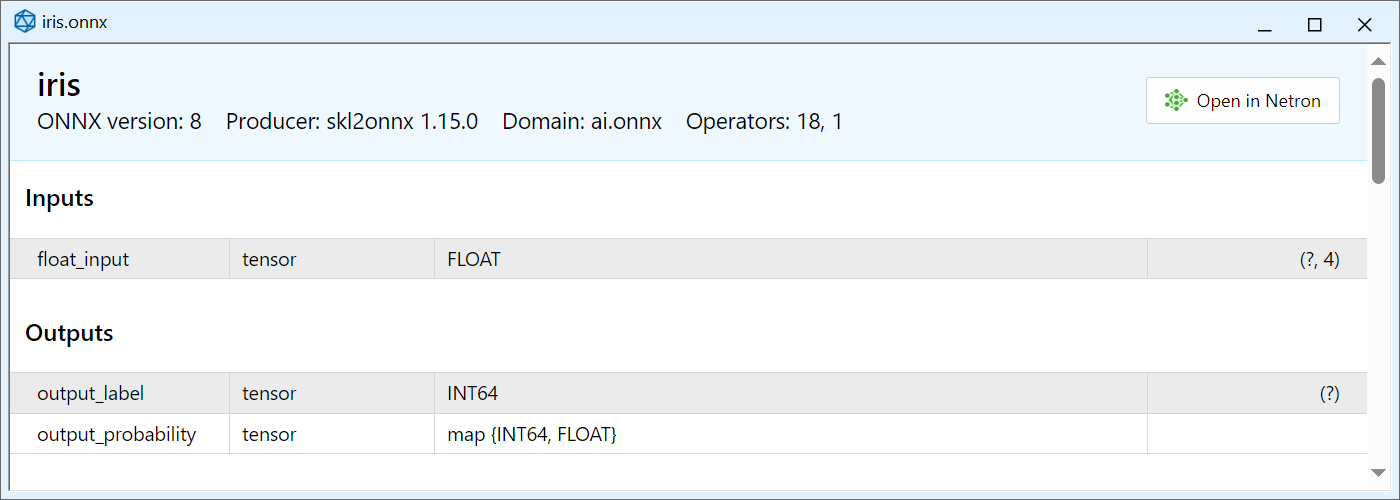
Open the created onnx file in MetaEditor:
The Map sequence is passed as "output_probability". It has a key of INT64 type (which corresponds to long in MQL5) and the float type value. To receive data from this output, declare the following structure:
struct MyMap
  {
   long              key[];
   float             value[];
  };
Here we used dynamic arrays with appropriate types. In this case, we can use fixed arrays because the Map for this model always contains 3 key+value pairs.
Since the Map sequence is returned, an array of such structures should be passed as a parameter for receiving data from output_probability output. This array can be dynamic or fixed, in accordance with the properties of a particular model. Example:
//--- declare an array to receive data from the output layer output_probability
MyMap output_probability[];

...

//--- model running
OnnxRun(model,ONNX_DEBUG_LOGS,float_input,output_label,output_probability);
MetaEditor
- Fixed display of output types in the ONNX model viewer.
MetaTrader 5 Web Terminal build 3980
- Added Contact Broker section in the web terminal's main menu.
- Added error handling for SSL authentications. This authentication type is not supported in the web terminal. One-time passwords can be used instead.
- Fixed desktop platform download link in the main menu.
- Fixed accounts managing dialog. If the broker does not provide the demo or real account opening option, the relevant menu item will be hidden.
Earlier publications:
- MetaTrader 5 Build 3950: Deposits/withdrawals in the terminal and updated trading report
- MetaTrader 5 build 3800: Book or Cancel orders, AI coding assistant, and enhanced ONNX support
- MetaTrader 5 build 3660: Improvements and fixes
- MetaTrader 5 build 3640: Web Terminal in 11 languages
- MetaTrader 5 build 3620: Web Terminal improvements, ONNX support and fast matrix multiplications in MQL5